In this article we look at the CIS Critical Security Controls (CIS controls), and how they can help to provide security focus for your company or organization.
Most organizations don’t struggle because they lack security advice. They struggle because they have way too much of it and not enough action. Professionals are drowning in tools, alerts, and competing opinions. There are thousands of security vendors, endless threat intel feeds that contradict each other, and a compliance world that can reward paperwork more than real risk reduction.
That overload creates a nasty problem, paralysis. When everything is a top priority, nothing is. Teams buy the next shiny product while basic gaps sit untouched. In the current world of cloud/remote work, and data everywhere, you do not win by trying to do everything. You win by doing the right things, in the right order.
That is where the Center for Internet Security (CIS) stands out. CIS offers a practical set of actions based on the top risks. They are called “CIS Critical Security Controls” (CIS Controls) and are a prioritized roadmap built by people who deal with real incidents. Follow them and you move from reacting to every fire, to building a steady, resilient security posture.
Who CIS is, and why it matters
CIS is a 501(c)(3) nonprofit founded in October 2000. The idea was simple: gather experts from government, industry, and academia, then publish benchmarks that organizations can actually use to reduce cyber risk.
The CIS controls also have deep roots in the SANS Institute. They began as the SANS Top 20, one of the first serious attempts to rank defensive actions by effectiveness against attacks seen in the wild. In 2015, CIS took full ownership and leadership of the controls and continued evolving them into the standard many teams use today.
CIS stays close to real operations. It runs the Multi-State Information Sharing and Analysis Center (MS-ISAC) and the Elections Infrastructure ISAC (EI-ISAC). Through those programs, CIS provides full-time monitoring and support for U.S. state, local, tribal, and territorial governments. That gives CIS best insights to attacker behavior, what security folks call TTPs, tactics, techniques, and procedures. When a safeguard shows up in the CIS Controls, it is usually because someone saw that weakness exploited recently.
As Tony Sager (Senior VP at CIS and former COO of the NSA Information Assurance Directorate) put it: “Cybersecurity should be practical, accessible, and achievable for everyone, not a luxury reserved for the few.”
CIS also builds and runs operational services and tools, including Albert (an intrusion detection system) and Malicious Domain Blocking and Reporting (MDBR). That matters because it keeps the organization grounded in the day-to-day reality of networks, endpoints, and attackers.
How the CIS controls evolved: from the Top 20 to the CIS Controls v8.1
The CIS controls have changed because IT, security and technology changed. Early guidance was shaped by a world with mostly static assets. That world is gone.
In May 2021, CIS released CIS controls version 8, reducing the controls from 20 to 18. The big idea was to focus on security activities rather than „who owns the device“, so the guidance still fits on-prem, hybrid cloud, and SaaS-heavy environments.
In June 2024, CIS released CIS controls version 8.1. It was not a total rewrite, but it was an important sharpening. CIS described three design principles behind the update:
- Context: clearer explanations and examples so teams do not have to guess what a safeguard means.
- Coexistence: designed to fit alongside other common programs and requirements.
- Consistency: keeps continuity for existing users, so you do not have to rebuild your program every release.
One of the biggest shifts in CIS critical security controls v8.1 is the addition of the Govern security function. The message is straightforward: technical controls do not survive without organizational structure. Governance is how you keep policies, ownership, and leadership attention in place long enough for the technical work to stick.
The takeaways: what the controls push you to do first
Takeaway 1: Visibility comes before protection (controls 1 and 2)
Here is the uncomfortable truth, you cannot secure what you do not know you have.
Controls 1 and 2 are the foundation:
- Control 1, inventory and control of enterprise assets (hardware and connected things)
- Control 2, inventory and control of software assets (what runs in your environment)
In v8.1, (the definition of) Asset gets broader. Organizations are expected to account for seven asset types: devices, users, applications, data, networks, software, and documentation. That last one is easy to overlook, but it is a smart call. If your network is not documented, parts of it are effectively invisible.
Control 1 is about finding everything, both actively and passively. This includes servers and laptops, but also IoT devices, smart displays, and industrial systems. CIS even calls out tactical methods like DHCP logging (DHCP is the service that hands out IP addresses on many networks) to catch devices that show up briefly and then disappear. The goal is to shut down Shadow IT before an attacker uses an unmanaged device to get the foot in the door.
Control 2 focuses on making sure only authorized software is installed and runs. It includes program lists, libraries (shared code packages) and scripts. With supply chain attacks, knowing which libraries your apps depend on is key to survival.
Why it matters: asset management is not glamorous, but it is one of the highest impact things you can do. Every unknown asset is an unmonitored entry point.
Takeaway 2: Identity is the new perimeter (controls 5 and 6)
The old perimeter model, firewall in front, users inside, does not match how a modern IT landscape is currently implemented. In hybrid environments, identity and credentials often decide what an attacker can reach.
- Control 5, account management: manage the full lifecycle of accounts, especially privileged accounts
- Control 6, access control management: define and enforce what accounts are allowed to do
Control 5 pushes hard on admin accounts. In CIS controls v8.1, administrator accounts are described as elevated-privilege accounts assigned to a single user. Shared admin accounts are a bad practice because nobody can prove who did what. Safeguards include disabling sleeping accounts and separating admin access from everyday email and browsing.
Control 6 is where least privilege gets real. It also makes multi-factor authentication (MFA) essential. MFA means you need more than a password, for example a code from an authenticator app or a hardware key. CIS controls v8.1 emphasizes MFA for external apps, remote access, and especially administrative access, whether local or remote.
Why it matters: many breaches include unauthorized logins using stolen credentials. Strong account controls and MFA cut off a huge chunk of ransomware playbooks.
Takeaway 3: The defensive loop, configuration, vulnerabilities, and logs (controls 4, 7, and 8)
This is the keep the house in order part of security, and it is where resilience is built.
- Control 4, secure configuration: harden systems against known baselines
- Control 7, continuous vulnerability management: find and fix weaknesses fast
- Control 8, audit log management: collect and keep the evidence you need to detect and respond
Control 4 deals with the fact that most systems ship open, to be easy to use. CIS calls for hardening, including handling default accounts and unnecessary services, and using file integrity monitoring (FIM), which detects unauthorized changes to important files.
Control 7 recognizes that quarterly scans do not match attacker speed. A CVE (Common Vulnerabilities and Exposures identifier, basically a catalog number for a known vulnerability) can be weaponized quickly. CIS pushes continuous discovery, plus a documented process so issues actually get closed, not just reported.
Control 8 treats logs as the black box recorder for your environment. It includes things like DNS query logs and command-line audit logs, which can show exactly what an attacker ran after getting access.
Why it matters: systems change over time. Configurations loosen, patches get delayed, logs get missed. This loop is how you stay grounded in reality instead of assumptions.
Takeaway 4: Harden the human gateway (controls 9 and 14)
Attackers go where it is easiest. Often, that is a person.
- Control 9, email and web browser protections: reduce the most common entry points
- Control 14, security awareness and skills training: teach people what to look for and what (not) to do
Control 9 covers technical protections like DNS filtering (blocking known bad domains) and DMARC (an email authentication standard that helps reduce spoofing). It also calls out browser extensions, which have become a real risk because they can steal session tokens or bypass protections if they are abused.
Control 14 encourages role-specific training, because developers, HR, finance, and IT admins face different risks. It also stresses fast reporting, turning employees into a distributed sensor network for your SOC (security operations center).
Why it matters: no tool catches everything. When a targeted message slips through, the user is often the last real control between close tab and company-wide incident.
Takeaway 5: Protect the data, plan for recovery (controls 3 and 11)
At the end of the day, most attacks are about data, stealing it, changing it, or locking it up.
- Control 3, data protection: know your sensitive data and protect it through its lifecycle
- Control 11, data recovery: make sure you can restore quickly and safely
Control 3 calls for a data management process, an inventory of sensitive data, and protections like encryption for data at rest and in-transit. It also mentions DLP (data loss prevention), tools that can detect and block unauthorized data exfiltration.
Control 11 is the assume something will get through reality check. CIS pushes automated backups that are protected and tested. Tested matters, because untested backups are often broken backups. Isolation and immutability are also emphasized, meaning backups are kept in a place attackers cannot easily alter or encrypt.
Why it matters: data is usually the prize. Recovery is what keeps an incident from becoming an existential crisis.
Takeaway 6: Active defense and network integrity (controls 10, 12, and 13)
Once attackers land, they often move sideways. Your job is to spot that movement and limit how far it can go.
- Control 10, malware defense: detect and stop malicious code on endpoints
- Control 12, network infrastructure management: maintain secure, known network foundations
- Control 13, network monitoring and defense: watch the network and control traffic flows
Control 10 encourages moving beyond signature-only antivirus toward behavior-based detection, often called EDR (endpoint detection and response). It also includes simple steps like disabling auto-run for removable media to reduce plug in a device, get infected scenarios.
Controls 12 and 13 focus on keeping network documentation current, maintaining secure network configurations, and using segmentation. Segmentation means separating parts of the network so a compromise in one area does not automatically expose everything else.
Why it matters: attackers spread. Segmentation slows them down, monitoring helps you notice, EDR helps you respond. That time gap is where defenders win.
Takeaway 7: Manage your ecosystem, vendors and software (controls 15 and 16)
Most organizations rely on third parties, cloud providers, SaaS tools, contractors, and shared components. That expands your risk whether you like it or not.
- Control 15, service provider management: track providers and manage access and offboarding
- Control 16, application software security: build and buy software with security baked in
Control 15 calls for an inventory of service providers and a formal approach to managing them. It also stresses secure decommissioning. When a contract ends, you need to revoke access and make sure data is returned or destroyed.
Control 16 covers secure development practices and the risks around APIs. It also calls for an SBOM (software bill of materials), which is a list of components and dependencies used in software, useful for responding quickly when a library is found vulnerable.
Why it matters: supply chain attacks are real, and they often bypass your perimeter entirely. Vendor management and software security close doors you do not directly control.
Takeaway 8: Prove it works, incident response and pentesting (controls 17 and 18)
The last layer is about testing your assumptions.
- Control 17, incident response management: build and practice your response plan
- Control 18, penetration testing: simulate real attacker behavior to find chains of weakness
Control 17 requires clear ownership, documented processes, and regular exercises like tabletop simulations. The goal is simple, you do not want to write your incident plan during the incident.
Control 18 goes beyond vulnerability scanning. Scans find known issues. Pen tests find attack paths, combinations of small problems that add up to a big breach.
Why it matters: preparation is the difference between a controlled response and chaos. Testing is how you find the truth, not the comforting version.
How CIS makes this manageable: Implementation groups
CIS knows do all safeguards immediately is not realistic. CIS controls v8.1 includes 153 safeguards, so CIS organizes them into implementation groups (IGs). These groups are cumulative, meaning IG2 includes everything in IG1, and IG3 includes everything.
- IG1: 56 safeguards, essential cyber hygiene that helps stop common, non-targeted attacks. This is the baseline for almost everyone.
- IG2: adds 74 more safeguards, 130 total, for organizations with dedicated security staff and more complex environments.
- IG3: adds the final 23 safeguards, 153 total, aimed at high-risk organizations dealing with targeted attacks and advanced threats.
A common trap is trying to jump straight to the most advanced work because the budget exists. If you do not have basic asset inventory, access control discipline, and patching rhythm, the „advanced“ layers will not hold.
These are the official definitions of the CIS controls Implementation Groups (IGs):
Implementation Group 1
An IG1 enterprise is small to medium-sized with limited IT and cybersecurity expertise to dedicate toward protecting IT assets and personnel. The principal concern of these enterprises is to keep the business operational, as they have a limited tolerance for downtime. The sensitivity of the data that they are trying to protect is low and principally surrounds employee and financial information.
Safeguards selected for IG1 should be implementable with limited cybersecurity expertise and aimed to thwart general, non-targeted attacks. These Safeguards will also typically be designed to work in conjunction with small or home office commercial off-the-shelf (COTS) hardware and software.
Implementation Group 2
An IG2 enterprise employs individuals responsible for managing and protecting IT infrastructure. These enterprises support multiple departments with differing risk profiles based on job function and mission. Small enterprise units may have regulatory compliance burdens. IG2 enterprises often store and process sensitive client or enterprise information and can withstand short interruptions of service. A major concern is loss of public confidence if a breach occurs.
Safeguards selected for IG2 help security teams cope with increased operational complexity. Some Safeguards will depend on enterprise-grade technology and specialized expertise to properly install and configure.
Implementation Group 3
An IG3 enterprise employs security experts that specialize in the different facets of cybersecurity (e.g., risk management, penetration testing, application security). IG3 assets and data contain sensitive information or functions that are subject to regulatory and compliance oversight. An IG3 enterprise must address availability of services and the confidentiality and integrity of sensitive data. Successful attacks can cause significant harm to the public welfare.
Safeguards selected for IG3 must abate targeted attacks from a sophisticated adversary and reduce the impact of zero-day attacks.
Integrating CIS Controls into Threat Modeling
The CIS Critical Security Controls provide a practical framework that can significantly enhance threat modeling processes by offering concrete, prioritized mitigation strategies for identified threats. When conducting threat modeling exercises like STRIDE, PASTA or attack tree analysis, security teams often identify numerous potential threats but struggle to prioritize remediation efforts. The CIS Controls address this challenge by providing a battle-tested, prioritized set of defensive measures that map directly to common attack patterns. By cross-referencing identified threats with relevant CIS Controls, companies and organizations can move beyond theoretical risk assessment to actionable security implementations that address real-world attack vectors.
During the threat identification phase of threat modeling, the CIS Controls serve as a comprehensive checklist to ensure that common threat vectors aren’t overlooked. For instance, when modeling threats to a web application’s authentication mechanism, the threat modeling exercise might identify credential stuffing and brute force attacks. Rather than developing custom countermeasures from scratch, teams can reference CIS Control 6 (Access Control Management) and Control 5 (Account Management) to implement industry-standard protections like multi-factor authentication, account lockout policies, and privileged access management. This approach ensures that security measures are both comprehensive and aligned with proven defensive strategies that have demonstrated effectiveness across thousands of organizations.
The CIS Controls also enable security-by-design by providing a structured framework for embedding security requirements early in the development lifecycle. When threat modeling during the design phase of new systems or applications, architects can proactively incorporate relevant CIS Controls as baseline security requirements rather than treating security as an afterthought. For example, when designing a cloud-based data processing system, threat modeling might reveal risks around data exfiltration and unauthorized access. By integrating CIS Control 3 (Data Protection), Control 14 (Security Awareness Training), and Control 13 (Network Monitoring and Defense) into the initial architecture, the design inherently includes encryption, access controls, logging, and monitoring capabilities. This proactive integration transforms threat modeling from a risk documentation exercise into a blueprint for secure system design.
Furthermore, the Implementation Groups (IG1, IG2, IG3) within the CIS Controls framework help organizations tailor their threat modeling mitigation strategies to their actual security maturity and resources. Not every threat requires enterprise-grade controls, and the tiered approach allows teams to implement appropriate safeguards based on their risk profile and organizational capabilities. This prevents both under-protection of critical assets and wasteful over-engineering of low-risk components, ensuring that security investments align with actual threat exposure identified during the modeling process.
Wrap-up: The real value of the CIS Controls
The CIS Controls (or CIS Critical Security Controls) work because they push you toward fundamentals that attackers consistently exploit, and they do it in a prioritized order. They help teams cut through noise, stop chasing every new product, and build a security program that holds up when things go wrong.If you want a practical next step, start with IG1, then prove you can run it consistently. Security should be treated as a habit that builds and improves over time.
Control Overview
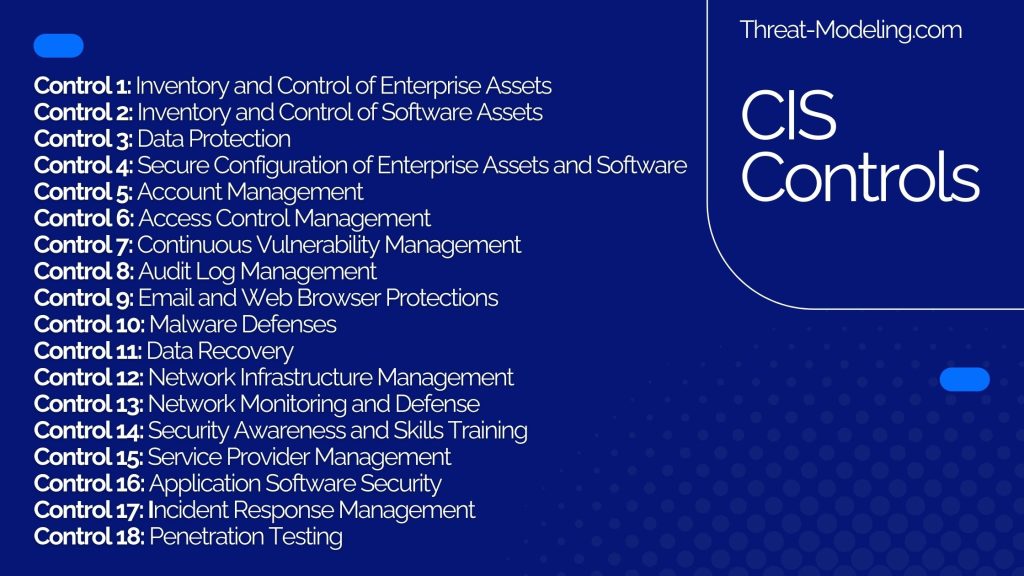
Control 1: Inventory and Control of Enterprise Assets
Actively manage (inventory, track, and correct) all enterprise assets (end-user devices, including portable and mobile; network devices; non-computing/Internet of Things (IoT) devices; and servers) connected to the infrastructure physically, virtually, remotely, and those within cloud environments, to accurately know the totality of assets that need to be monitored and protected within the enterprise. This will also support identifying unauthorized and unmanaged assets to remove or remediate.
Control 2: Inventory and Control of Software Assets
Actively manage (inventory, track, and correct) all software (operating systems and applications) on the network so that only authorized software is installed and can execute, and that unauthorized and unmanaged software is found and prevented from installation or execution.
Control 3: Data Protection
Develop processes and technical controls to identify, classify, securely handle, retain, and dispose of data.
Control 4: Secure Configuration of Enterprise Assets and Software
Establish and maintain the secure configuration of enterprise assets (end-user devices, including portable and mobile; network devices; non-computing/IoT devices; and servers) and software (operating systems and applications).
Control 5: Account Management
Use processes and tools to assign and manage authorization to credentials for user accounts, including administrator accounts, as well as service accounts, to enterprise assets and software.
Control 6: Access Control Management
Use processes and tools to create, assign, manage, and revoke access credentials and privileges for user, administrator, and service accounts for enterprise assets and software.
Control 7: Continuous Vulnerability Management
Develop a plan to continuously assess and track vulnerabilities on all enterprise assets within the enterprise’s infrastructure, in order to remediate, and minimize, the window of opportunity for attackers. Monitor public and private industry sources for new threat and vulnerability information.
Control 8: Audit Log Management
Collect, alert, review, and retain audit logs of events that could help detect, understand, or recover from an attack.
Control 9: Email and Web Browser Protections
Improve protections and detections of threats from email and web vectors, as these are opportunities for attackers to manipulate human behavior through direct engagement.
Control 10: Malware Defenses
Prevent or control the installation, spread, and execution of malicious applications, code, or scripts on enterprise assets.
Control 11: Data Recovery
Establish and maintain data recovery practices sufficient to restore in-scope enterprise assets to a pre-incident and trusted state.
Control 12: Network Infrastructure Management
Establish, implement, and actively manage (track, report, correct) network devices, in order to prevent attackers from exploiting vulnerable network services and access points.
Control 13: Network Monitoring and Defense
Operate processes and tooling to establish and maintain comprehensive network monitoring and defense against security threats across the enterprise’s network infrastructure and user base.
Control 14: Security Awareness and Skills Training
Establish and maintain a security awareness program to influence behavior among the workforce to be security conscious and properly skilled to reduce cybersecurity risks to the enterprise.
Control 15: Service Provider Management
Develop a process to evaluate service providers who hold sensitive data, or are responsible for an enterprise’s critical IT platforms or processes, to ensure these providers are protecting those platforms and data appropriately.
Control 16: Application Software Security
Manage the security life cycle of in-house developed, hosted, or acquired software to prevent, detect, and remediate security weaknesses before they can impact the enterprise.
Control 17: Incident Response Management
Establish a program to develop and maintain an incident response capability (e.g., policies, plans, procedures, defined roles, training, and communications) to prepare, detect, and quickly respond to an attack.
Control 18: Penetration Testing
Test the effectiveness and resiliency of enterprise assets through identifying and exploiting weaknesses in controls (people, processes, and technology), and simulating the objectives and actions of an attacker.